A machine shuts down for maintenance. A technician reaches in to clear a jam. Without verified isolation, a startup sequence activates—leading to catastrophic injury. This isn’t hypothetical. It’s a preventable failure where lockout tagout (LOTO) documentation was either missing, incomplete, or ignored.
At the heart of every effective energy control program lies the lockout tagout documentation form—a legally required, operationally critical tool that verifies equipment isolation and protects workers from hazardous energy. Yet, too many organizations treat it as a box-ticking exercise. That mindset invites risk.
This guide cuts through the compliance clutter. You’ll learn exactly what belongs on a LOTO documentation form, how to structure it for real-world use, and why skipping details isn’t just dangerous—it’s a legal liability.
What Is a Lockout Tagout Documentation Form?
A lockout tagout documentation form is a written record that details how machinery or equipment is isolated from all hazardous energy sources before service or maintenance. It’s not just a checklist—it’s a step-by-step verification tool that ensures every energy source (electrical, hydraulic, pneumatic, thermal, chemical, etc.) is controlled.
Unlike general safety policies, this form is applied during each maintenance event. It includes:
- Equipment identification
- Type and location of energy sources
- Specific lockout devices used
- Authorized employee names
- Time and date of lock application and removal
OSHA’s standard 29 CFR 1910.147 mandates that facilities using hazardous equipment maintain documented procedures. The documentation form is the operational manifestation of that rule.
Without it, even the best-trained team operates on assumptions—not proof.
Key Components of an Effective LOTO Form
A poorly designed form creates confusion. An effective one eliminates ambiguity. Here are the non-negotiable elements every lockout tagout documentation form should include.
1. Equipment Identification Specify the exact machine or system being serviced. Use asset numbers, location codes, or serial numbers—not vague labels like “conveyor belt” or “pump.”
Example: ✔️ Hydraulic Press Model HP-3200, Line 4, Station B ❌ Big press in back
2. Energy Source Inventory List all energy types associated with the equipment. For each, note the point of isolation.
Common Energy Sources: - Electrical (circuit breaker #CB-45) - Pneumatic (air line valve V-12) - Hydraulic (pressure release valve HR-8) - Thermal (steam line isolation valve ST-3) - Gravitational (counterweight lock)
3. Lock and Tag Details Record the lock number, assigned employee, and tag contents. This creates traceability.
Best Practice: Use color-coded locks tied to individual employees. The form should log: - Lock ID (e.g., “Red-07”) - Employee name and role - Time applied
4. Verification of Isolation
This is where most forms fail. Simply listing steps isn’t enough—workers must confirm zero energy.
Include a verification line such as: “I, [Name], have tested the machine controls and verified zero energy state.”

This step is required by OSHA and often overlooked in informal processes.
5. Sign-Off and Time Stamps Every action must be time-tracked:
- Lock application
- Work completion
- Lock removal
Include signature lines for the authorized employee and, in multi-person operations, each individual involved.
Common Mistakes That Invalidate LOTO Documentation
Even compliant-looking forms fail in practice due to recurring errors. Avoid these pitfalls:
❌ Using Generic Templates A one-size-fits-all form for all equipment violates OSHA’s requirement for equipment-specific procedures. A forklift’s LOTO process differs from a boiler’s—your documentation must reflect that.
Fix: Create individual forms for each machine or group similar equipment under standardized but distinct procedures.
❌ Skipping Verification Steps Writing “locked out” isn’t proof. If the form doesn’t require physical verification—like trying to start the machine after isolation—it’s incomplete.
Real-World Consequence: A technician at a packaging plant assumed a motor was de-energized. No verification was documented. The machine started during cleaning, resulting in a hand injury and a $98,000 OSHA fine.
❌ Allowing Unsigned or Backdated Forms Post-event documentation is unreliable. Forms must be completed in real time, signed on-site, and retained for audit.
Tip: Use carbon-copy forms or digital systems that timestamp entries automatically.
❌ Failing to Update
After Equipment Changes A machine retrofit? New control panel? If the LOTO form isn’t revised, it’s obsolete.
Schedule quarterly reviews of all LOTO documentation, especially after maintenance or upgrades.
Digital vs. Paper-Based LOTO Documentation: What Works Best?
The debate isn’t about preference—it’s about reliability, accessibility, and compliance speed.
| Factor | Paper Forms | Digital Systems |
|---|---|---|
| Audit Readiness | Requires physical storage and manual retrieval | Instant access, searchable logs |
| Real-Time Verification | Prone to delays and errors | GPS, camera, and sensor integration |
| Multi-Craft Coordination | Difficult with overlapping work | Live sync across teams |
| Training Integration | Separate from procedure | Embedded videos, step guides |
| OSHA Inspections | Risk of lost or damaged forms | Cloud backup, tamper-proof logs |
Bottom Line: High-risk or large-scale operations benefit from digital LOTO documentation. Small shops with limited equipment can succeed with paper—if rigorously maintained.
Sample LOTO Documentation Form (Simplified)
Use this as a template foundation. Customize for each equipment type.
Lockout/Tagout Documentation Form
Equipment: CNC Lathe, Line 2, Asset #CL-205 Location: Machine Shop, Bay C Date: 04/05/2025 Authorized Employee: J. Rivera (Maintenance Tech II) Lock ID: Blue-14
- Energy Sources to Isolate:
- Electrical – Main disconnect (Panel 3, Breaker #12)
- Hydraulic – Pressure valve HV-5
- Pneumatic – Air supply valve AV-9
Steps Performed: ☐ Notified operations team of downtime ☐ Shut down machine via control panel ☐ Opened main disconnect and applied lock ☐ Closed and locked hydraulic valve ☐ Depressurized and locked pneumatic line ☐ Attempted startup to verify zero energy
Verification Statement: “I, J. Rivera, have isolated all energy sources and tested the machine. No hazardous energy is present.” Signature: _______________ Time Verified: 08:42 AM
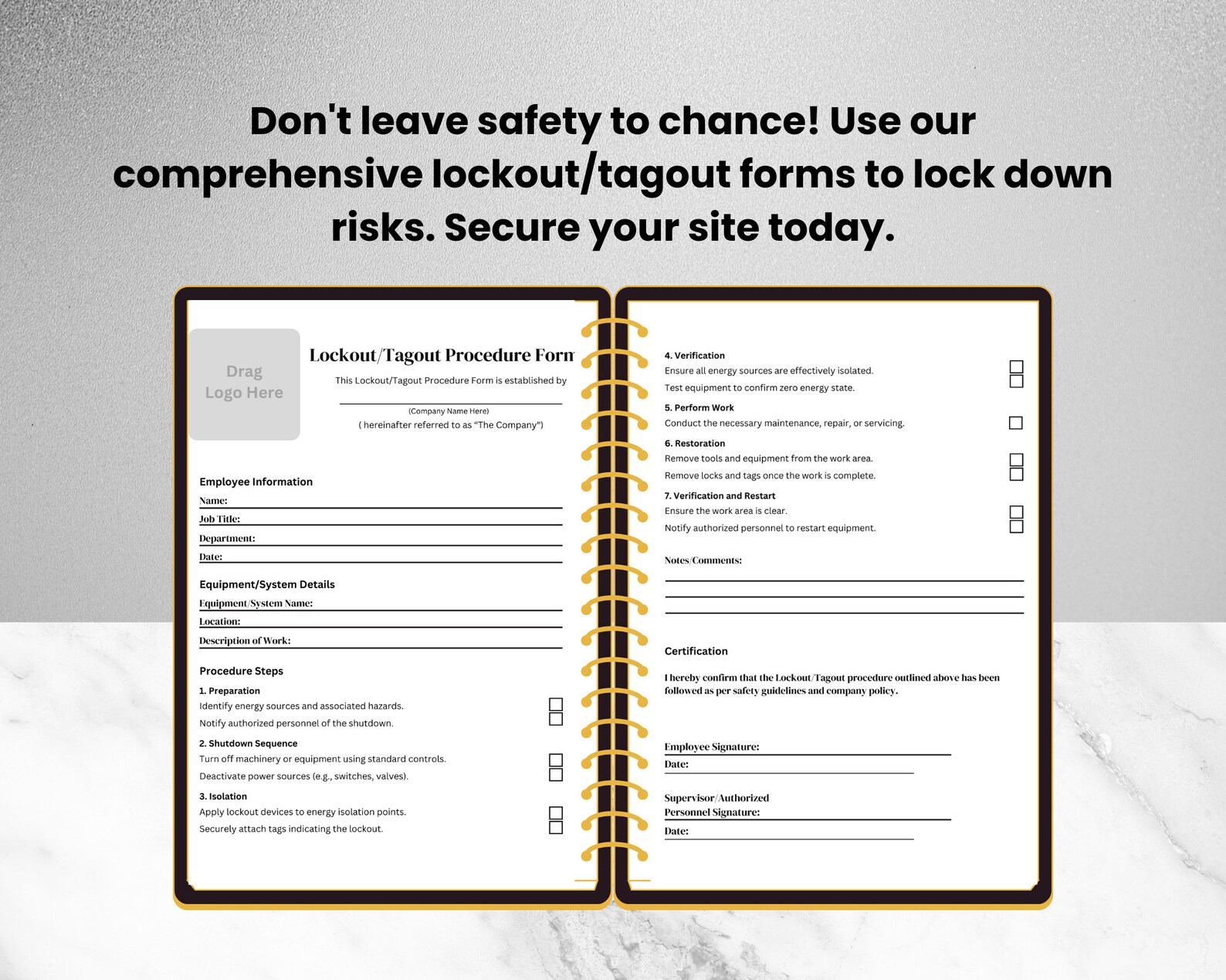
Work Completed: Bearing replacement Lock Removed By: J. Rivera Time Released: 10:15 AM Final Sign-Off: _______________
How to Implement LOTO Documentation in 5 Steps
Creating forms isn’t enough. They must be embedded in daily operations.
1. Conduct an Energy Audit Walk every machine. Identify every energy source. Document isolation points.
2. Build Equipment-Specific Forms Use the audit data to draft individual LOTO documentation forms. Include diagrams if needed.
3. Train Authorized and Affected Employees Authorized workers must understand how to complete the form. Affected employees (those who operate but don’t service) should recognize active LOTO.
4. Integrate Into Maintenance Workflows Tie form completion to work order systems. No form = no work.
5. Audit Monthly Review 10% of completed forms each month. Check for:
- Missing signatures
- Incomplete verification
- Equipment mismatches
Correct issues immediately.
Real-World Use Cases: When LOTO Documentation Prevented Disaster
Case 1: Chemical Plant, Texas During a valve replacement, a contractor began disassembly without filling out the LOTO form. A supervisor noticed the missing documentation, halted work, and discovered a secondary steam line still pressurized. The form wasn’t filled—but its absence triggered a safety check that prevented a scalding incident.
Lesson: The form’s presence—physical or digital—acts as a procedural gate.
Case 2: Automotive Assembly Line, Michigan A robotic arm required programming adjustments. The tech used a digital LOTO app to isolate the cell. The system required photo verification of lock placement and a timed countdown before allowing access. The process took 3 minutes longer—but eliminated risk of premature re-energization.
Lesson: Digital forms enforce discipline through design.
Tools and Platforms for Managing LOTO Documentation For organizations scaling beyond paper, dedicated tools improve compliance and reduce administrative burden.
| Tool | Key Features | Best For |
|---|---|---|
| Procore Safety | Mobile LOTO forms, photo proof, integration with work orders | Construction, industrial sites |
| SpheraCloud EHS | Digital lock management, real-time dashboards, audit trails | Large manufacturing plants |
| LockOut SafeTag (LOST) | Print-on-demand tags, barcode tracking, form templates | Mid-sized facilities |
| Fiix by Rockwell | CMMS with embedded LOTO workflows | Teams using preventive maintenance software |
| EHS Insight | Customizable forms, mobile access, OSHA reporting | Multi-site operations |
These platforms don’t replace training—but they reduce human error and create an auditable trail that paper can’t match.
Final Thoughts: Documentation Isn’t Bureaucracy—It’s Protection
A lockout tagout documentation form isn’t paperwork. It’s a legal record, a safety protocol, and a cultural indicator. When filled correctly, it proves that a company prioritizes people over production speed.
Don’t let complacency erode your process. Review your current forms. Are they equipment-specific? Do they require verification? Are they retained for at least one year?
Update them. Train on them. Audit them.
Because when a machine is down and a technician reaches in, the only thing standing between safety and tragedy is a completed LOTO documentation form—and the discipline to use it every single time.
FAQ
What should you look for in Lockout Tagout Documentation Form Essentials? Focus on relevance, practical value, and how well the solution matches real user intent.
Is Lockout Tagout Documentation Form Essentials suitable for beginners? That depends on the workflow, but a clear step-by-step approach usually makes it easier to start.
How do you compare options around Lockout Tagout Documentation Form Essentials? Compare features, trust signals, limitations, pricing, and ease of implementation.
What mistakes should you avoid? Avoid generic choices, weak validation, and decisions based only on marketing claims.
What is the next best step? Shortlist the most relevant options, validate them quickly, and refine from real-world results.