Every year, hundreds of workers suffer serious injuries—some fatal—because machinery was accidentally energized during maintenance. These incidents are preventable. At the heart of prevention is a simple yet powerful tool: the lockout tagout (LOTO) toolbox talk. When delivered consistently and supported by a clear, downloadable PDF, these short safety meetings reinforce procedures, close knowledge gaps, and save lives.
A lockout tagout toolbox talk PDF isn’t just a document—it’s a frontline defense. It transforms complex OSHA regulations into digestible, actionable content for workers on the floor. Whether you’re a safety manager, supervisor, or team lead, having a ready-to-use, well-structured PDF ensures your message is consistent, compliant, and impactful.
This guide breaks down how to create, deliver, and use an effective LOTO toolbox talk PDF, complete with real-world examples, common pitfalls, and ready-to-adapt content strategies.
Why a Lockout Tagout Toolbox Talk PDF Matters
Toolbox talks are brief, focused safety discussions—usually 10 to 15 minutes—held at the start of a shift or before a high-risk task. When centered on LOTO, they address one of the most dangerous moments in industrial work: when machines are shut down for service.
A PDF version of this talk serves multiple critical functions:
- Consistency: Ensures every team hears the same message, regardless of location or facilitator.
- Compliance: Provides documented proof of training, which OSHA may require during inspections.
- Accessibility: Can be printed, emailed, or loaded onto tablets for field use.
- Reference: Workers can review key points later, reinforcing retention.
Without a standardized PDF, toolbox talks risk becoming vague, inconsistent, or skipped altogether—especially under production pressure.
“We had a near-miss when a conveyor started during servicing. The mechanic wasn’t tagged out. After that, we started using a LOTO PDF talk every Monday. No incidents since.” — Plant Supervisor, Midwest Manufacturing Facility
What to Include in Your LOTO Toolbox Talk PDF
An effective PDF isn’t a regurgitation of the OSHA standard. It’s a practical, visual, and engaging aid tailored to your workforce. Here’s what should be inside:
1. Clear Purpose Statement Start with a one-sentence goal: “Today’s talk: Why every worker must apply their own lock and tag before servicing equipment.”
2. Key Definitions Define essential terms simply:
- Lockout: Physically isolating energy sources with a lock.
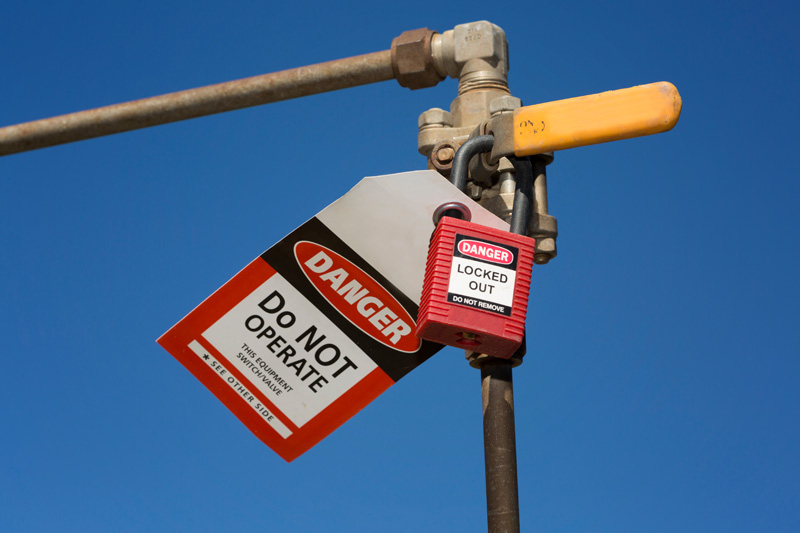
- Tagout: Attaching a warning tag to indicate equipment is not to be operated.
- Authorized Employee: Trained to perform LOTO procedures.
- Affected Employee: Operates or uses the equipment but doesn’t service it.
3. Step-by-Step LOTO Procedure Outline the 6 basic steps:
- Prepare for shutdown
- Notify affected employees
- Shut down the machine
- Isolate energy sources (electrical, hydraulic, pneumatic, etc.)
- Apply locks and tags
- Verify isolation (test for zero energy)
Use icons or flowcharts to simplify this.
4. Real-World Scenario Include a short example relevant to your workplace:
“Last month, a technician bypassed a lock because he thought the machine was ‘safe.’ It wasn’t. A co-worker restarted it remotely. The technician lost two fingers. This could’ve been avoided with proper verification.”
5. Common Mistakes to Avoid Highlight frequent errors:

- Using someone else’s lock
- Skipping verification
- Not locking all energy sources
- Removing a tag without authorization
6. Visual Aids Add photos or diagrams:
- Correct vs. incorrect lock application
- Examples of energy isolation points
- Tag placement on control panels
7. Discussion Questions Prompt engagement:
- “Have you ever seen a shortcut taken during LOTO?”
- “What would you do if you found a machine tagged out but needed to use it?”
8. Sign-Off Sheet Include a page for attendees to sign, proving they participated.
Common Pitfalls in LOTO Toolbox Talks (and How to Fix Them)
Even with a PDF, many teams fail to get results. Here’s what goes wrong—and how to correct it.
❌ Problem: One-Size-Fits-All Content
Many companies use generic LOTO talks downloaded from the internet. But a talk designed for a chemical plant won’t resonate with a warehouse mechanic.
✅ Fix: Customize the PDF. Use equipment names, photos from your facility, and local incident history.
❌ Problem: No Follow-Up The talk ends, signatures are collected, and nothing changes. Workers revert to old habits.
✅ Fix: Add a “30-day audit” note in the PDF. Example: “Next week, safety staff will check if all presses are being locked out correctly.”
❌ Problem: Passive Delivery Supervisors read from the PDF like a script, killing engagement.
✅ Fix: Design the PDF as a discussion guide, not a monologue. Use bold questions, leave space for notes, and encourage workers to share experiences.
❌ Problem: Rare or Inconsistent Use LOTO talks happen only during audits or after incidents.
✅ Fix: Schedule them monthly. Use the PDF as part of a rotating safety calendar. Pair it with equipment-specific refreshers.
How to Use a LOTO Toolbox Talk PDF in Practice
Here’s a real-world workflow from a distribution center that reduced LOTO incidents by 70% over 18 months:
- Monday Mornings: Area supervisors print the current PDF (hosted on the company’s safety portal).
- 5-Minute Prep: They review the content, pull relevant photos, and prepare a demo lock.
- Shift Start Huddle: 10-minute talk using the PDF. Workers sign in.
- Spot Check: Supervisor observes the first maintenance task of the day.
- Feedback Loop: Notes from the talk are sent to the safety team for trending.
The PDF is updated quarterly with new scenarios, near-misses, or regulatory reminders. Over time, it becomes a living document—not a compliance checkbox.
5 Downloadable LOTO Toolbox Talk PDF Templates You Can Use
While you should customize your own, starting with a solid template speeds up development. Here are five reliable sources:
| Template Source | Key Features | Best For |
|---|---|---|
| OSHA.gov | Official, plain-language guide with checklist | Regulated industries needing audit-proof content |
| SafetyNow | Editable PDFs with visual aids and sign-off sheets | Companies using digital safety platforms |
| Creative Safety Supply | Industry-specific talks (e.g., for forklifts, conveyors) | Facilities with diverse equipment |
| EHS Daily Advisor | Ready-to-print talks with discussion prompts | Managers needing quick weekly content |
| National Safety Council (NSC) | Behavior-based focus with incident examples | Teams building a safety culture |
Pro Tip: Download one, then rebrand it with your company logo, facility photos, and internal procedures. Turn it into your standard.
When a PDF Isn’t Enough: Supporting Tools for LOTO Success
A toolbox talk PDF is a starting point—not the entire program. Pair it with:
- Hands-on drills: Monthly lockout practice on decommissioned equipment.
- Quick-reference cards: Pocket-sized LOTO checklists for technicians.
- Digital reminders: Push notifications via safety apps before PM work.
- Audits: Random checks of lock application and tag clarity.
One refinery uses QR codes on machinery that link directly to the LOTO PDF for that unit. Workers scan before starting work—ensuring they’ve reviewed the correct procedure.
Creating Your Own LOTO Toolbox Talk PDF: A Step-by-Step Workflow
Don’t rely solely on templates. Build one that fits your team.
Step 1: Audit Past Incidents Review maintenance-related injuries. What failed? Energy control? Verification? Use these as talk topics.
Step 2: Involve Frontline Workers Ask technicians what confuses them about LOTO. Their input makes the PDF more relatable.
Step 3: Draft with Clarity Use short sentences. Avoid jargon. Example: ❌ “Ensure the isolation of all potentially hazardous energy sources.” ✅ “Turn off power, close valves, and block movement before you start.”
Step 4: Design for Readability Use:
- 14pt font minimum
- Bullet points, not paragraphs
- Color contrast (red for warnings, green for correct actions)
Step 5: Test It Run the PDF with a small group. Ask: “Could you explain this to a new hire?”
Step 6: Distribute and Track Upload to your intranet, email to leads, and require sign-offs. Archive for compliance.
Final Thoughts: Make LOTO a Habit, Not an Event
A lockout tagout toolbox talk PDF is more than a training aid—it’s a culture builder. When used consistently, it reminds workers daily that safety isn’t negotiable. It turns abstract rules into real behaviors.
Your goal isn’t just to check a box. It’s to ensure that every time a machine stops, every technician locks out with confidence—and returns home safely.
Start today: Download a template, customize it with your team’s voice, and run your first talk this week. Repeat monthly. Track improvements. Make LOTO part of your operational rhythm.
Because in the end, the best PDF isn’t the one that looks perfect—it’s the one that prevents the next accident.
Frequently Asked Questions
What is a lockout tagout toolbox talk PDF? It’s a printable or digital safety briefing document used to educate workers on proper lockout tagout procedures before maintenance tasks.
Who should conduct a LOTO toolbox talk? Supervisors, safety officers, or authorized employees trained in energy control procedures should lead the discussion.
How often should LOTO toolbox talks be held? At minimum, monthly. More frequent talks are recommended after incidents, near-misses, or when new equipment is introduced.
Can a PDF replace formal LOTO training? No. A toolbox talk PDF supplements initial and annual LOTO training but doesn’t replace hands-on certification.
Should workers sign the LOTO toolbox talk PDF? Yes. Signatures document attendance and acknowledge understanding, which supports OSHA compliance.
Are there free LOTO toolbox talk PDFs available? Yes. OSHA, NSC, and safety supply companies offer free, downloadable templates that can be customized.
How long should a LOTO toolbox talk last? Ideal duration is 10 to 15 minutes—long enough to cover key points, short enough to maintain attention.
FAQ
What should you look for in Lockout Tagout Toolbox Talk PDF Guide for Safety Teams? Focus on relevance, practical value, and how well the solution matches real user intent.
Is Lockout Tagout Toolbox Talk PDF Guide for Safety Teams suitable for beginners? That depends on the workflow, but a clear step-by-step approach usually makes it easier to start.
How do you compare options around Lockout Tagout Toolbox Talk PDF Guide for Safety Teams? Compare features, trust signals, limitations, pricing, and ease of implementation.
What mistakes should you avoid? Avoid generic choices, weak validation, and decisions based only on marketing claims.
What is the next best step? Shortlist the most relevant options, validate them quickly, and refine from real-world results.